The Challenge: A Repetitive Excel Task
For a children's clothing company, my colleague was in charge of creating the inventory replenishment report. She was already using Excel, but the process was very manual. Every time, she would have to re-filter the data, re-type formulas, and manually figure out how to source the stock we needed.
I thought to myself, since she's already in Excel, why not create a template for this? A tool where she could just paste in the latest inventory data and let the template do all the calculations for her.
My Solution: A Smart, Automated Template
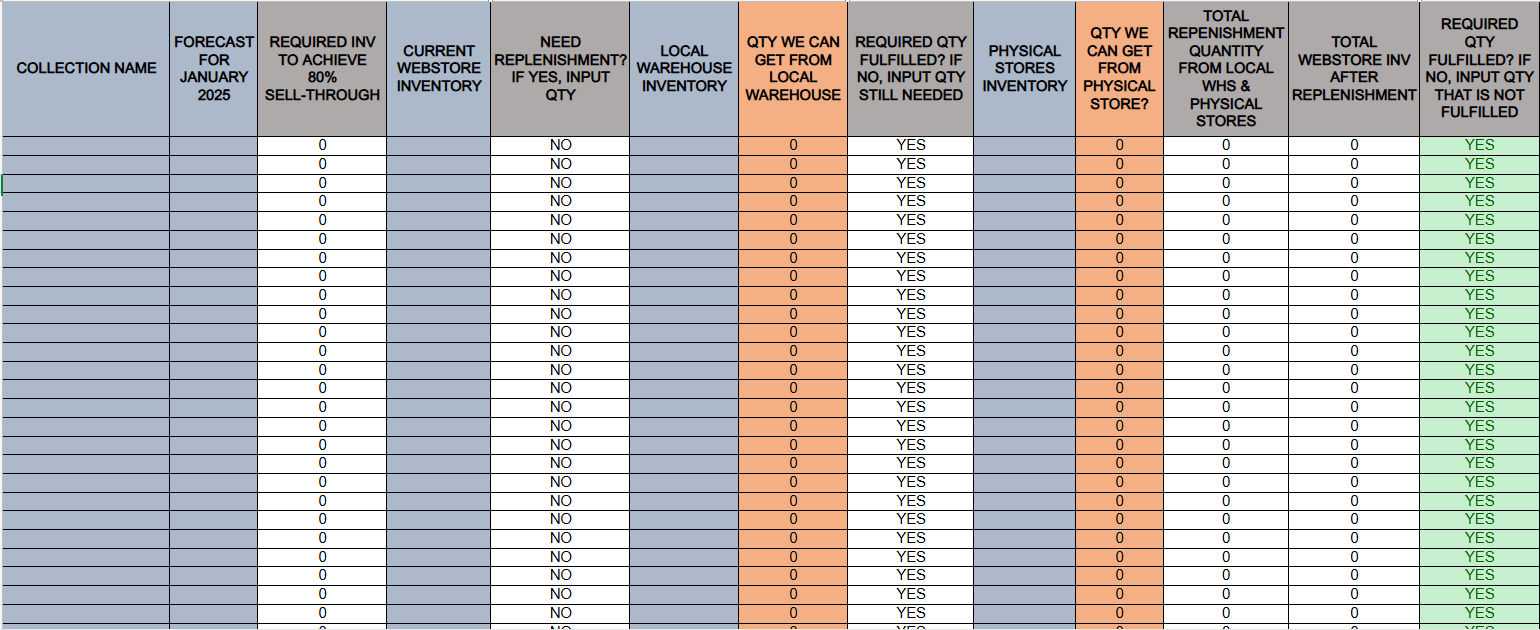
I developed a smart Excel template that completely automates the replenishment logic. I used a series of nested IF and IFS formulas to handle all the decision-making that my colleague was doing by hand.
The new workflow is much faster:
- Use VLOOKUP or just copy-paste the latest data: design codes, forecasts, and current inventory from the webstore, warehouse, and physical stores.
- The template instantly does the rest.
How It Works: The Automated Logic
- Calculates Replenishment Need: It automatically checks if an item is below its forecast and calculates exactly how many units we need.
- Prioritizes Sourcing: The formula is smart. It first tries to get the stock from the local warehouse and automatically takes only what's needed, even if more is available.
- Finds from Other Stores: If the warehouse doesn't have enough, the template automatically calculates the remaining amount and figures out if we can pull it from our physical stores.
- Gives a Clear Report: The end result is a clean report that tells you exactly how many units to get from each location for every single design. No more manual filtering or calculations.
Live Demo: Interactive Template
Below is a live, embedded version of the template populated with sample data. You can see how the formulas automatically calculate the replenishment needs.
Project Overview
Process Automation, Inventory Management, Advanced Excel Formulas
Microsoft Excel, IFS Function, VLOOKUP